
OpenScribe
OpenScribe is a self-hosted, bot-free meeting transcription, calendar context, and meeting intelligence system for macOS and the web.
It pairs a native macOS menu bar application (native/) and a Chrome companion extension (extension/) with a single-container Go + PocketBase + React server (server/ and web/). You can run the server locally or deploy it to your own infrastructure with Docker or OpenShip. All AI provider keys, OAuth client secrets, encrypted Google Calendar tokens, and meeting records remain on your own server.
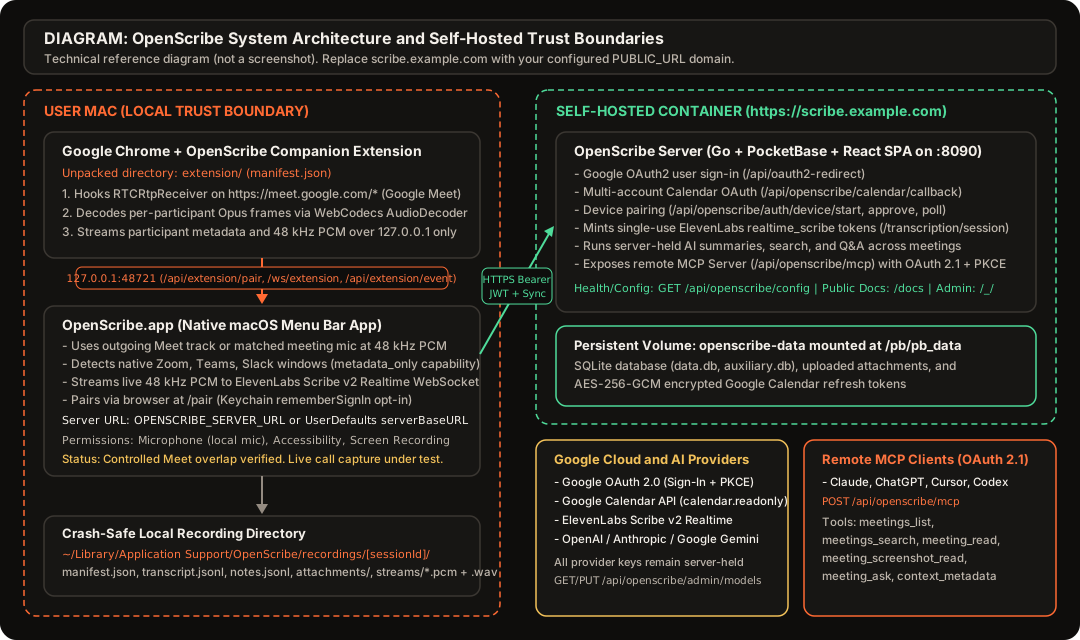
Application access currently uses Google only. Set OPENSCRIBE_ADMIN_EMAIL to the comma-separated Google email addresses allowed to create accounts and sign in. Password login, OTP and public signup are disabled. Authorized users can still connect Calendar accounts outside this list.
Documentation Guides
- Public Web Documentation (
/docs): Crawlable HTML documentation served directly by every OpenScribe instance at<PUBLIC_URL>/docs/without requiring login. - Google OAuth & Multi-Account Calendar Setup (
docs/google-oauth-calendar.md): Dedicated Google Cloud project creation, Google Auth Platform (Branding,Audience,Data Access,Clients) configuration, exact callback URIs,Testingvs.In productionrefresh token lifetimes, and PKCE + HMAC-SHA256 state verification. - Self-Hosting & OpenShip Deployment (
docs/self-hosting.md): Complete.envreference (.env.required), local development, Docker deployment (PB_ENCRYPTION_KEY+openscribe prepare), and step-by-step OpenShip deployment with persistent volume storage at/pb/pb_data. - macOS Menu Bar App & Chrome Extension (
docs/macos-and-extension.md): Building and installingOpenScribe.appand the unpacked Chrome companion extension, configuringOPENSCRIBE_SERVER_URLorserverBaseURL, browser-based device pairing (/pair), opt-in macOS Keychain storage (rememberSignIn), active-meeting context rules, permissions, and crash-safe local recordings. - Living Knowledge Architecture (
docs/living-knowledge.md, Proposed Design): Proposed temporal entity, fact, and citation architecture for cross-meeting people, company, and project knowledge. - Backend API & Schema Reference (
server/API.md): Complete HTTP route, PocketBase collection schema, and payload reference.
Platform Capture Status and Prototype Capability Matrix
OpenScribe enforces strict attribution integrity (server/API.md and native/Sources/OpenScribeCore/Models.swift). It never invents speaker identities, never fabricates participant email addresses, and never hides mixed or unmapped audio behind guessed speaker labels.
The table below reports the actual prototype capability and verification state for each platform in this repository:
| Platform | Identifier | Capture Capability | Speaker Attribution Mode | Verification Status & Evidence |
|---|---|---|---|---|
| Google Meet (Chrome + Extension) | google_meet | per_participant_pcm | one_mapped_source, mixed_sources, unmapped | Controlled overlap verified, full installed extension-to-native-to-backend live two-speaker path not yet accepted. Extension hooks RTCRtpReceiver (extension/src/main-runtime.js and extension/src/opus-pipeline.js), decodes per-stream Opus frames via WebCodecs AudioDecoder at 48 kHz, maps CSRCs to participant device IDs, and streams PCM over 127.0.0.1:48721. Controlled two-sender separation and DTX/rejoin were proven in .agents/skills/meet-analysis/SKILL.md and .agents/skills/meet-analysis/references/findings.md. A later attempted live acceptance ended with a provider filter failure before the two-speaker test ran. |
| Local Microphone (macOS App) | local_mic | single_stream_verified | local_mic | Verified local capture, active meeting-mic following unit-tested. When the Chrome extension supplies the outgoing Meet audio track (outgoingMeetingTrack), OpenScribe.app uses that stream directly. Otherwise LocalMicrophoneCapturer.swift resolves the meeting input device by matching the browser-reported or app-selected device UID/label (coreAudioMatchedDevice) or active audio-input process before falling back to the system default input device (systemDefaultFallback). |
| Microsoft Teams (Browser Research Path) | teams_browser | single_stream_verified | one_mapped_source, mixed_sources, unmapped | Tested research receive path (single active speaker). Browser WebRTC receiver capture was tested for single-speaker attribution (csrc_single) in .agents/skills/teams-analysis/references/findings.md. It is not enabled in extension/manifest.json host permissions by default, and overlapping multi-speaker separation is not claimed. |
| Microsoft Teams (macOS Desktop App) | teams_native | mixed_audio (adapter fixture-tested, coordinator unintegrated) | mixed_sources + local_mic | Adapter fixture-tested, RecorderCoordinator integration and live speech capture incomplete. TeamsNativeAdapter.swift and TeamsNativeAdapterTests.swift pass 5 Swift fixture tests covering presence (idle, preview, waiting, joined, ended, unknown), duplicate names, fail-closed mute handling, microphone selection, and honest mixed_sources attribution. RecorderCoordinator.swift does not yet integrate TeamsNativeAdapter, real Teams speech capture is incomplete, and native per-person audio is unresolved. |
| Zoom (macOS Desktop App) | zoom_native | mixed_audio (live speech unresolved) | mixed_sources + local_mic | Wired in RecorderCoordinator and unit-tested, controlled live speech capture failed. ZoomNativeAdapter.swift is wired into RecorderCoordinator.swift and implements CoreAudio process-output mixed capture (zoom_remote_mixed with attribution = "mixed_sources" and speakerName = nil) plus separate local microphone capture following Zoom's selected input device, fail-closed mute gating, and duplicate-name preservation (ZoomNativeAdapterTests.swift). The latest two controlled live speech attempts failed peakAbs > 500 and nonZeroSamples > 4800, leaving real Zoom speech capture and native per-person audio unresolved. |
| Slack Huddle (macOS Desktop App) | slack_huddle | metadata_only | local_mic + metadata | Window and huddle state detection plus offline store replay only. MeetingPresenceDetector.swift detects active Slack huddles, and .agents/skills/slack-analysis/SKILL.md provides offline huddle store replay. Live huddle audio capture and per-speaker isolation remain unresolved. |
Key Capabilities
- Per-Participant Google Meet Capture (48 kHz PCM) & Active-Meeting Context:
- The Chrome companion extension (
extension/) intercepts WebRTCRTCRtpReceiverencoded streams onhttps://meet.google.com/*, decodes each remote participant stream in an isolated WebCodecsAudioDecoderinstance at 48,000 Hz, and forwards PCM frames and participant metadata toOpenScribe.appoverws://127.0.0.1:48721/ws/extension(with HTTP fallback toPOST http://127.0.0.1:48721/api/extension/event). OpenScribe.apprecords your local voice (local_mic) via the outgoing Meet track orLocalMicrophoneCapturer.swiftwhen unmuted and writes crash-safe local recordings under~/Library/Application Support/OpenScribe/recordings/<sessionId>/before syncing to your server.- Notes, links, screenshots, and dropped files can be added in
OpenScribe.app(CompanionView.swift) only while a meeting is confirmed active (canAddMeetingContext == true, verified in--self-testwhile interactive picker/drop UI verification remains pending). Once a meeting ends, post-meeting notes, links, and files are added in the web application (MeetingDetailView.tsx).
- The Chrome companion extension (
- Pluggable Multi-Provider ASR & Honest Capability Reporting (
server/transcription/):GET /api/openscribe/transcription/providers,PUT /api/openscribe/admin/transcription,POST /api/openscribe/transcription/session,GET /api/openscribe/transcription/openai-realtime, andPOST /api/openscribe/transcription/audio(server/transcription/and Backend API Reference) support four transcription providers alongside native workers inTranscriptionStreamManager.swift:- ElevenLabs Scribe v2 Realtime (
elevenlabs,scribe_v2_realtime): Single-userealtime_scribetokens (server/elevenlabs.go),pcm_48000WebSocket streaming, realtime word timestamps (supports_word_timestamps = true), and automatic language detection (supports_language_detection = true). - OpenAI Realtime (
openai_realtime,gpt-4o-mini-transcribe,gpt-4o-transcribe,gpt-live-transcribe):pcm1624 kHz WebSocket transcription (supports_word_timestamps = falseon realtime delta/completed events) routed through the authenticated, meeting-owner-scoped backend WebSocket relay atGET /api/openscribe/transcription/openai-realtime. Session bootstrap returnstoken = ""and a relative backendwebsocket_urlso the native client authenticates only to the OpenScribe backend with its appAuthorization: Bearerheader, keeping OpenAI credentials on the server and lockingaudio.input.transcription.modelto the admin-selected model even if a client sends asession.updateoverride. - Google Gemini Live (
gemini_realtime,models/gemini-3.5-transcribe-live,models/gemini-2.5-flash-native-audio-latest): Single-use constrained ephemeral token (uses: 1) lockingbidiGenerateContentSetupto the selected model (supports_word_timestamps = false). - OpenAI-Compatible HTTP STT (
openai_compatible,mlx-community/whisper-large-v3-turbo,whisper-1): Chunked WAVmultipart/form-datatranscription starting with conservative capabilities (supports_word_timestamps = false,supports_language_detection = false) and learning supported fields only from actual responses. Direct device-local loopback (data_destination = "local_loopback",no_cloud_upload_in_local_mode = true) is reported separately fromserver_proxy_http(/api/openscribe/transcription/audio,no_cloud_upload_in_local_mode = false), which uploads client audio to the configured OpenScribe backend even when the backend's own upstream is loopback.
- ElevenLabs Scribe v2 Realtime (
- Multi-Account Google Calendar Sync (
calendar.readonly):- Connect multiple Google accounts (personal
@gmail.comand Google Workspace accounts) to a single OpenScribe user profile viaPOST /api/openscribe/calendar/connect. - Refresh tokens are encrypted at rest in PocketBase using AES-256-GCM (
OPENSCRIBE_TOKEN_ENCRYPTION_KEY). - Recurring meetings are grouped strictly by
(owner, calendar_account, calendar_id, recurring_event_id)and never by meeting title alone.
- Connect multiple Google accounts (personal
- Server-Held AI Summaries, Action Items, and Cross-Meeting Search:
- Summarize meetings (
POST /api/openscribe/meetings/{id}/summarize), extract evidence-backed action items with segment quotes, enrich speaker profiles (people_profiles), and ask questions across meetings (POST /api/openscribe/meetings/{id}/ask). - Administrators matching
OPENSCRIBE_ADMIN_EMAILcan configure active models per workload (tagging,profile_enrichment,qa,summary,action_items) viaGET /api/openscribe/admin/modelsandPUT /api/openscribe/admin/models.
- Summarize meetings (
- Remote MCP Server with OAuth 2.1 + PKCE (
/api/openscribe/mcp):- Built-in Streamable HTTP Model Context Protocol (MCP) server at
/api/openscribe/mcpwith RFC 9728 Protected Resource Metadata (/.well-known/oauth-protected-resource), RFC 8414 Authorization Server Metadata (/.well-known/oauth-authorization-server), dynamic client registration (/api/openscribe/oauth/register), and OAuth 2.1 + PKCE authorization (/api/openscribe/oauth/authorize). - Exposes 6 owner-scoped tools (
meetings_list,meetings_search,meeting_read,meeting_screenshot_read,meeting_ask,context_metadata) for Claude, ChatGPT, Cursor, Codex, and other MCP clients.
- Built-in Streamable HTTP Model Context Protocol (MCP) server at
Repository Layout
openscribe/
├── server/                  # Go + PocketBase backend, OAuth, Calendar sync, AI providers, MCP server
│   ├── main.go              # Entrypoint, static SPA + /docs serving, prepare command, bootstrap
│   ├── API.md               # Full HTTP endpoint and PocketBase collection contract
│   ├── calendar.go          # Multi-account Google Calendar OAuth 2.0 + PKCE + signed state
│   ├── auth.go              # Google login bootstrap, /auth/me, and /auth/device/* pairing
│   ├── elevenlabs.go        # ElevenLabs single-use realtime_scribe token minting
│   ├── transcription/       # Multi-provider ASR registry, session bootstrap, and HTTP audio proxy
│   ├── admin_ai.go          # Admin AI workload model routing (/api/openscribe/admin/models)
│   ├── mcpauth/             # OAuth 2.1 + PKCE + Dynamic Client Registration for MCP
│   └── mcpbridge/           # Streamable HTTP MCP server (/api/openscribe/mcp)
├── web/                     # React 19 + TypeScript + Vite web application
│   ├── public/              # Brand assets, icons, robots.txt, sitemap.xml, and generated /docs HTML
│   └── src/                 # Web UI components, calendar filter, live scribe, pair approval
├── native/                  # Native macOS menu bar application (Swift 6 / AppKit + SwiftUI)
│   ├── Sources/             # OpenScribeCore and OpenScribeApp targets (Zoom/Teams adapters, ASR workers)
│   └── scripts/build-app.sh # Builds ./native/dist/OpenScribe.app
├── extension/               # Manifest V3 Chrome companion extension for Google Meet
│   ├── src/                 # JavaScript content-script modules and WebCodecs Opus pipeline
│   ├── background.js        # Extension service worker bridging to 127.0.0.1:48721
│   └── build.mjs            # Bundles meet-main.js and meet-isolated.js into extension/
├── docs/                    # Technical documentation source and static HTML generator
│   ├── build-docs.mjs       # Renders README.md, docs/*.md, and server/API.md into web/public/docs/
│   ├── google-oauth-calendar.md
│   ├── self-hosting.md
│   ├── macos-and-extension.md
│   ├── living-knowledge.md  # Proposed living knowledge architecture
│   └── assets/              # Technical SVG diagrams
├── .env.required            # List of required and optional environment variable keys
├── Dockerfile               # Multi-stage Node 22 + Go 1.27 + Alpine 3.23 container build
├── docker-entrypoint.sh     # Bootstrap superuser and launch openscribe serve --dev=false
└── openship.json            # OpenShip deployment configuration (port 8090, /pb/pb_data volume)
Quick Start (Clean Checkout Local Setup)
Prerequisites
- Go 1.27+ (
golang:1.27-alpineused inDockerfile) - Node.js 22+ and
npm - macOS 14.2+ (Sonoma or newer) with Xcode Command Line Tools (
swift) if building the native macOS menu bar app
1. Configure Environment Variables
Create .env in the repository root (see .env.required for the key list) and lock down file permissions so secrets are only readable by your user account:
touch .env
chmod 600 .env
For local development on http://127.0.0.1:8090, set at minimum in .env:
PUBLIC_URL=http://127.0.0.1:8090
PORT=8090
PB_DATA_DIR=./pb_data
OPENSCRIBE_ADMIN_EMAIL=you@example.com,colleague@example.com
PB_ADMIN_EMAIL=you@example.com
PB_ADMIN_PASSWORD=replace-with-strong-password
PB_ENCRYPTION_KEY=0123456789abcdef0123456789abcdef
OPENSCRIBE_TOKEN_ENCRYPTION_KEY=replace-with-64-hex-chars-from-openssl-rand-hex-32
Add GOOGLE_CLIENT_ID and GOOGLE_CLIENT_SECRET after completing the Google OAuth & Calendar Setup Guide, and add ELEVENLABS_API_KEY, OPENAI_API_KEY, ANTHROPIC_API_KEY, and GOOGLE_API_KEY to enable live transcription and AI workloads.
2. Build the Public Docs and Web Frontend
Running npm run build inside web/ automatically invokes docs/build-docs.mjs (npm run build:docs) to generate /robots.txt, /sitemap.xml, and web/public/docs/** before compiling the React frontend into web/dist/:
cd web
npm ci
PUBLIC_URL=http://127.0.0.1:8090 npm run build
cd ..
3. Build and Start the OpenScribe Server
Always pass --dev=false so PocketBase does not print sensitive SQL parameters or tokens to standard output:
cd server
go build -o openscribe .
./openscribe prepare --dev=false --dir="${PB_DATA_DIR:-./pb_data}" --encryptionEnv=PB_ENCRYPTION_KEY
./openscribe serve --dev=false --http=127.0.0.1:8090 --dir="${PB_DATA_DIR:-./pb_data}" --encryptionEnv=PB_ENCRYPTION_KEY
4. Verify the Local Server and Public Documentation
In another terminal, verify the public configuration endpoint and static /docs/ pages:
curl -sS http://127.0.0.1:8090/api/openscribe/config
curl -sS -I http://127.0.0.1:8090/docs/
Open http://127.0.0.1:8090 for the web application or http://127.0.0.1:8090/docs/ for the public documentation.
5. Build the Chrome Companion Extension and macOS App (Optional on macOS)
node extension/build.mjs
./native/scripts/build-app.sh
open ./native/dist/OpenScribe.app
Load the extension/ directory as an unpacked extension at chrome://extensions. See the macOS App & Chrome Extension Guide for server URL configuration, device pairing, and permissions.